


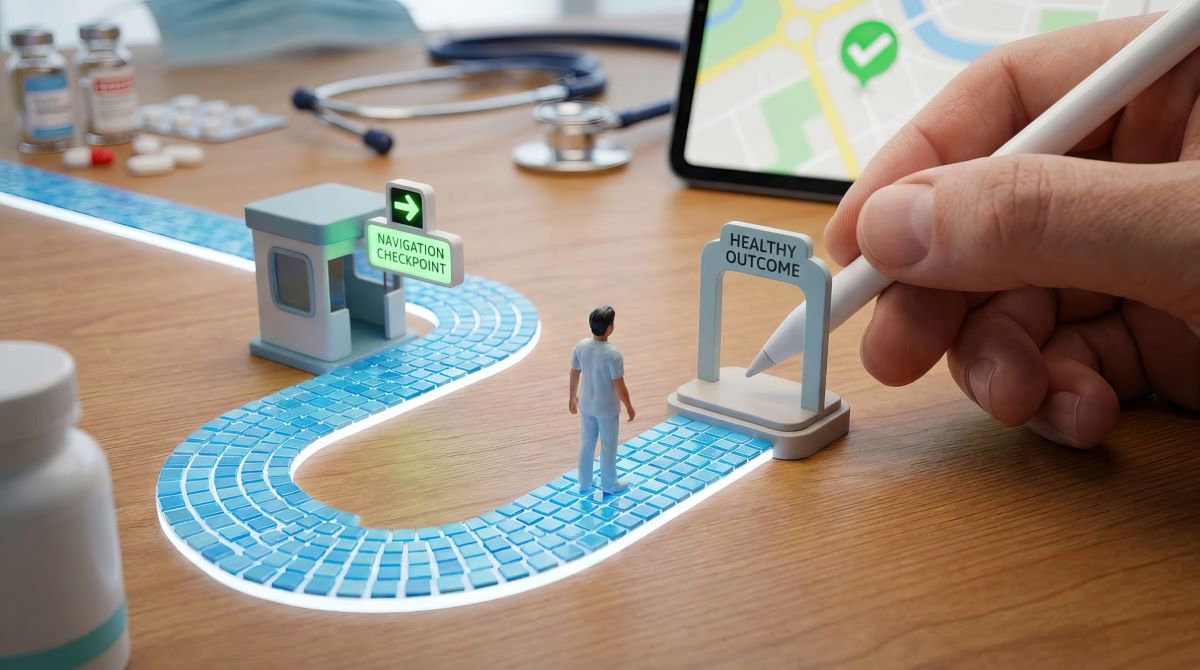
Patient journey mapping is the process of visualising everything a patient goes through from the moment they first contact your clinic to post-treatment follow-up. It helps healthcare organisations understand what patients experience at each touchpoint, where the journey breaks down, and where there's room to improve.
Done well, it's one of the most effective ways to improve patient satisfaction, reduce friction, and deliver consistently high-quality care. The challenge is that mapping the journey (and then actually managing it) involves many moving parts, and the available tools vary widely in what they do and who they're built for.
This article covers two categories:
- Patient journey management software — platforms that help you collect feedback, automate communication, and manage the patient experience.
- Patient journey mapping tools — solutions that help you analyse and visualise the journey.
For each, we've reviewed the leading options, compared their key features, and highlighted who they're best suited for. Let's jump straight in!
6 Popular patient journey management software
Managing the patient journey is very similar to managing the overall patient experience. This is why patient experience platforms have become a dominant solution for private clinics seeking to optimize patient journeys.
These platforms can automate scheduling and communication, collect and analyse patient feedback at scale, surface real-time alerts, break down data silos, and provide leadership with the reporting they need to improve the patient experience at every touchpoint.
The right patient journey management software for your clinic depends on the size of your operation, budget, and which part of the journey needs the most attention.
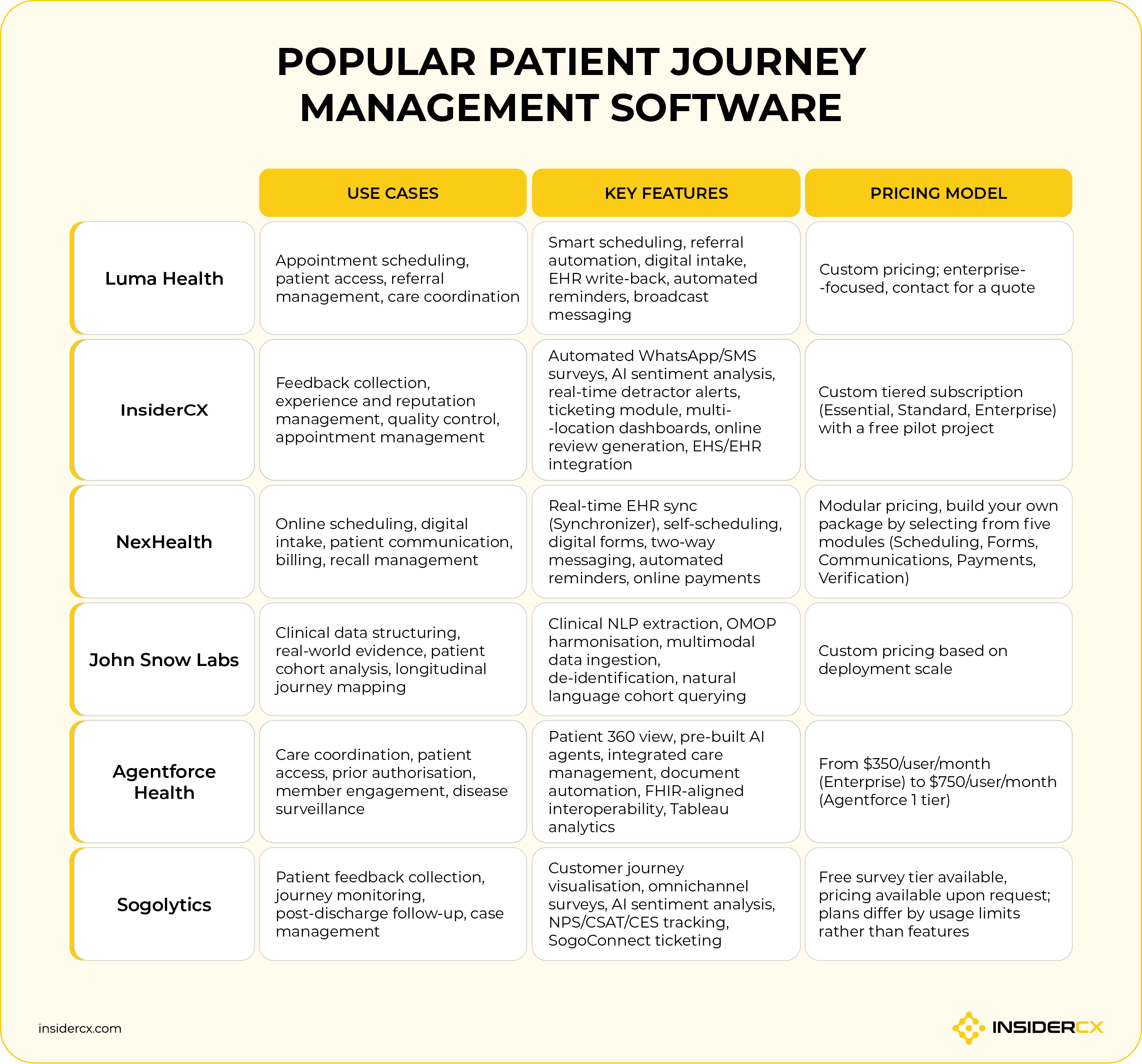
1. Luma
Luma Health is a patient access and engagement platform built for health systems and larger healthcare organisations. Its Spark AI orchestration layer automates scheduling, referral management, digital intake, and patient communication end-to-end with the goal of eliminating the bottlenecks that slow patients from getting care.
Key features:
- AI-powered smart scheduling and self-scheduling via SMS.
- Automated referral management with 1-click booking links.
- Digital intake forms with EHR write-back.
- Appointment reminders, recall messaging, and broadcast messaging.
- Multilingual patient communication.
- Real-time analytics and reporting dashboard.
Top 3 advantages:
- Saves time and reduces no-shows. [What I liked most about Luma Health is how easy it is to use and how much time it saves. The appointment reminders and smart waitlists really helped reduce no-shows, and the integration with our system was smooth. The support team is also super helpful! — Ziyad B. on Capterra]
- Easy to use for everyone on the team. [It’s easy to use for any user, whether they have experience with technology or not. — Kayla B. on Capterra]
- Responsive, knowledgeable support. [The thing I love most about Luma Health is the support they provide. Seeking support 24/7 is the most important thing in my book. — Gerson S. on Capterra]
Top 3 drawbacks:
- Onboarding takes longer than expected. [Initial onboarding took a bit longer than expected, and some training materials could be improved. — Bahar F. on Capterra]
- Highly customised workflows can be a challenge. [The list is short, but the hardest part of dealing with Luma is trying to fit some of our highly customized workflows into patient messaging processes. Luma will always work with us to find a solution for a given issue, but there are some custom workflows that we have that do not easily fit into their product. — Vincent B. on Capterra]
- Occasional reliability issues with reminders and rescheduling. [My least favorite thing about Luma Health is the inconvenience with rescheduling patients. Or how some patients don't get reminders. — Sarah F. on Capterra]
2. InsiderCX
InsiderCX is a patient experience and feedback platform built specifically for private healthcare. It automates the full feedback loop — it collects and analyses feedback across all major touchpoints, after which every issue is logged, assigned, and tracked to resolution (before it has the chance to appear on Google or Trustpilot as a bad review).
Key features:
- Automated post-visit feedback collection via WhatsApp and SMS.
- AI sentiment analysis and open-text categorisation across all responses, visualised across the whole patient journey (the algorithm is built to catch recurring issues with booking, parking, communication, wait time, follow-up care, etc.).
- Real-time alerts for negative experiences with built-in issue ticketing.
- Personalized appointment confirmation, reminders, and rescheduling messages to reduce no-shows.
- Multi-location dashboards with trend tracking and competitor benchmarking.
- Export-ready reports for leadership, accreditation, and external partners.
- EU data residency, GDPR compliance, and full data processing agreement.
Top 3 advantages:
- Captures the silent majority. InsiderCX surveys every patient automatically, getting clinics 8 to 10 times more feedback than handing out paper surveys. [The amount of patient feedback we are now receiving through InsiderCX is 10x what we were seeing using the old process. — Mark Norfolk, The Dermatology Partnership]
- Turns feedback into decisions at every level. Real-time alerts, automated ticketing, and role-based reporting mean issues get flagged and resolved fast. [We now understand our patients better, respond faster, and make more informed decisions at every level of the organization. — Lidija Gregurek, Arsano Medical Group]
- Controls quality across the entire care pathway, including partners. InsiderCX can structure feedback across pre- and post-treatment touchpoints, and even track the quality of external service providers. [With InsiderCX, we get a feedback loop we can use to control the quality of both post and pre-treatment. — Ana Kričković, Optical Express]
Top 2 drawbacks:
- Better suited to multi-site organisations. InsiderCX is designed for clinic groups and hospital networks managing experience across multiple locations. Single-site and independent practices with low patient volume won’t get as much value from the software.
- Primarily focused on the UK and European markets. InsiderCX is built around the European healthcare context and compliance frameworks and is currently not available for clinics in the US or Asia.
If you’re interested in how InsiderCX would fit into your operational context, don’t hesitate to schedule a quick product demo.
3. NexHealth
NexHealth is a patient experience platform built for dental and medical practices, with a strong focus on digitising and automating the operational front end of the patient journey. Its proprietary Synchronizer technology syncs directly with EHR and practice management systems to centralize bookings, cancellations, billing, intake forms, and other data.
Key features:
- Real-time online self-scheduling with automated waitlist management.
- Digital intake forms with instant EHR write-back.
- Automated appointment reminders and recall sequences.
- Secure two-way patient messaging.
- Online payment collection with billing sync.
- Review request automation post-appointment.
Top 3 advantages:
- Real-time EHR sync saves significant manual work. [In the past we had to manually import patient record updates. We love that it does that for you. It is saving us so much time. — Caydie J. on G2]
- Easy for both staff and patients to use. [It makes scheduling and patient communication much more efficient, and the online forms have significantly reduced paperwork and manual data entry. The platform is user-friendly for both staff and patients, which helps improve the overall experience on both sides.— Martha M. on G2]
- Responsive onboarding and support. [Customer service has been attentive and responsive anytime we've needed anything and helped walk us through many steps, answering any questions that myself or the doctors have. This exceptional support and going above and beyond really made the experience outstanding. The setup was also extremely easy, thanks to the wonderful customer service. — Jeff M. on G2]
Top 3 drawbacks:
- Pricing can be restrictive, especially for smaller practices. [The cost is a bit restrictive and I wish there were more customizable packages. — Noelle B. on G2]
- Reporting and customisation feel limited. [At times, data exports and reporting can feel limited, especially when trying to access detailed responses from forms. Additionally, certain features may require more customization to better fit specific workflows. — Martha M. on G2]
- Sync doesn't always cover everything. [It doesn’t sync all information, including forms. — Verified User in Medical Practice on G2]
4. John Snow LABS
John Snow Labs is a healthcare AI company whose Patient Journey Intelligence (PJI) platform sits in a different category from the other tools in this list. It's not a patient-facing engagement tool, but a data infrastructure platform for organisations that need to extract, structure, and analyse clinical information at scale. It has a more niche use as it focuses on unstructured sources like clinical notes, pathology reports, and discharge summaries.
Key features:
- Clinical NLP (Natural Language Processing) extraction of 400+ medical entity types from unstructured text, like disease names, medications, lab values, and symptoms buried in clinical notes (this data usually isn’t captured in EHR fields).
- Multimodal data ingestion: PDFs, FHIR records, DICOM imaging files, clinical notes, and insurance claims, regardless of format.
- Automatic harmonisation to the OMOP Common Data Model (a standardised structure that makes patient data comparable across systems and institutions).
- Regulatory-grade de-identification with a full PHI (Protected Health Information) audit trail.
- Natural language cohort building; query your patient population the way you'd ask a question, without writing code (e.g., “show me all diabetic patients over 60 who had a readmission within 30 days").
- Conflict resolution across contradictory data sources.
Top 3 advantages:
- Turns unstructured clinical data into usable intelligence. [The best feature of John Snow Labs is the medical chatbot, which allows me to ask for queries, medical queries, and medical terminology. I also use it for clinical reports to generate and convert text into structured data. I can easily generate clinical reports and lab reports. — Noorain F. on AWS]
- Regulatory-grade governance built in from the start. Every extracted clinical fact includes confidence scoring, full data lineage, and provenance tracking to the source document and line number. For organisations working with real-world evidence or regulatory submissions, this removes a substantial governance overhead.
- Population-level journey insights. PJI works at scale and identifies where readmissions cluster, where patients drop out of care, and where gaps consistently appear across the journey, so health systems can fix systemic problems rather than firefighting case by case.
Top 3 drawbacks:
- Not a tool for clinical operations teams. PJI requires data science and engineering expertise to implement and derive value from. It's built for enterprise health systems, research organisations, and life sciences companies, not for day-to-day patient engagement or clinic operational insights.
- Not a patient journey management tool in the traditional sense. PJI doesn't collect feedback, automate patient communication, or manage touchpoints in real time. It's an analytical infrastructure platform, so it tells you what happened across the journey after the fact, not a tool for actively managing or improving the experience as it unfolds.
- Enterprise scope, enterprise cost. The platform is priced and scoped for large-scale deployments. Smaller healthcare organisations, or those without a data team, might not get meaningful value from it.
5. Agentforce Health
Agentforce Health (formerly Salesforce Health Cloud) is Salesforce's AI-first platform for healthcare, connecting patient data, care coordination, scheduling, and agentic AI automation across the full patient journey. It's best for large healthcare organisations already invested in the Salesforce ecosystem — or those that need deep integration across clinical, operational, and commercial functions.
Key features:
- Unified Patient 360 profile across clinical and non-clinical data.
- Pre-built AI agents for scheduling, care coordination, and more.
- Integrated Care Management with flexible care plans and care gap closure.
- Intelligent Document Automation with AI-powered extraction and routing.
- FHIR-aligned APIs and EHR interoperability via MuleSoft.
- AI analytics via Tableau Next integration.
- HIPAA, HITRUST, FedRAMP, and GDPR compliant with built-in Agentforce Trust Layer.
Top 3 advantages:
- A genuinely unified view of the patient. [The "Patient 360" view is the strongest feature. As a developer, I appreciate that the Care Observations data model (based on FHIR standards) is ready out-of-the-box. We use it to track patient vitals—like Blood Glucose levels and HbA1c—directly on the timeline. It means clinicians don't have to switch back and forth between the EMR and Salesforce to see a patient's progress. — Chintan S. on G2]
- Powerful for organisations already in the Salesforce ecosystem. [Salesforce Health Cloud is great if your organization has the expertise to integrate with your EMR system. All the functionality of service cloud plus healthcare related synergies to help with easy to use appointment reminders and further health suggestions are a huge plus. — Christina C. on TrustRadius]
- Pre-built AI skills accelerate time to value. Rather than building automation from scratch, organisations can deploy ready-made agent skills for high-volume tasks like eligibility checks, appointment scheduling, and care outreach.
Top 3 drawbacks:
- Not purpose-built for patient journey management. Agentforce Health is primarily a CRM and care coordination platform. Patient journey management is one of many use cases it can support, but organisations looking for dedicated journey mapping, touchpoint analysis, or experience measurement will find it lacks the depth of purpose-built tools.
- Journey continuity depends on integration completeness. A connected patient journey view is only possible if all relevant systems (EHR, claims, scheduling, external providers) are fully integrated. Any gaps in integration create blind spots in the journey, and achieving full connectivity requires significant ongoing technical investment.
- Enterprise-priced, enterprise-scoped. Licensing costs are substantial, and the platform's breadth makes it oversized for smaller practices or single-site providers. It's built for health systems, not clinics.
6. Sogolytics
Sogolytics combines patient feedback collection, journey monitoring, sentiment analysis, and case management into a single HIPAA-compliant, ISO 27001-certified environment. Its SogoCX module maps and monitors key metrics across every patient touchpoint, while SogoConnect handles ticketing and resolution when issues arise.
Key features:
- Customer journey visualisation to map and monitor key metrics at every touchpoint (e.g., tracking satisfaction scores at booking, arrival, consultation, and post-visit follow-up to see exactly where the experience dips).
- Ready-to-use healthcare survey templates for patient satisfaction and post-discharge follow-up.
- Real-time CX dashboard with NPS, CSAT (Customer Satisfaction), and CES (Customer Effort Score) tracking, plus Key Driver Analysis to show which factors most influence patient satisfaction.
- Predictive churn indicators to flag patients who may be at risk of not returning before they disengage.
- EHR, CRM, and HIMS integration to bring all patient experience data into one place rather than managing it across disconnected systems.
Top 3 advantages:
- Responsive, solution-oriented support. [The best part is that whenever I need support or have a question, they respond quickly and they find a solution to my issue! — Cassaundra L. on G2]
- Balances ease of use with powerful analytics. [I like Sogolytics because it balances ease of use with powerful measuring tools. It captures meaningful participant feedback and helps translate data into accountable insights. The initial setup was pretty swift and accessible. — Scrip I. on G2]
- Quick and intuitive to get started. [From the moment I signed up for a free Sogolytics trial account, the entire experience flowed with ease. I quickly found the survey builder, and the transition from tire-kicking to building out my envisioned survey was so straightforward. — Ron T. on G2]
Top 3 drawbacks:
- Limited language support and branching logic. [I wish that this platform supports more language for creating the forms. I wish that there was more branching and logic capabilities in this platform. — Konjengbam M. on G2]
- Some argue that it’s not that intuitive. [Some useful features feel locked behind paid plans, the design can feel a bit busy, and advanced tools take time to learn. It's still good, but not totally beginner-simple. — Fran X. on Capterra]
- Mobile experience needs improvement. [When you open it on your phone the page shifts a bit uncomfortably. It's not very neat and you need to scroll and move the page itself a lot in order to be able to see the buttons. — Anca D. on Capterra]
4 Best patient journey mapping tools
Patient journey mapping tools are used to structure and visualise the patient journey. They give healthcare organisations a clear, shared picture of what patients go through, so teams can spot where the experience breaks down — and fix it.
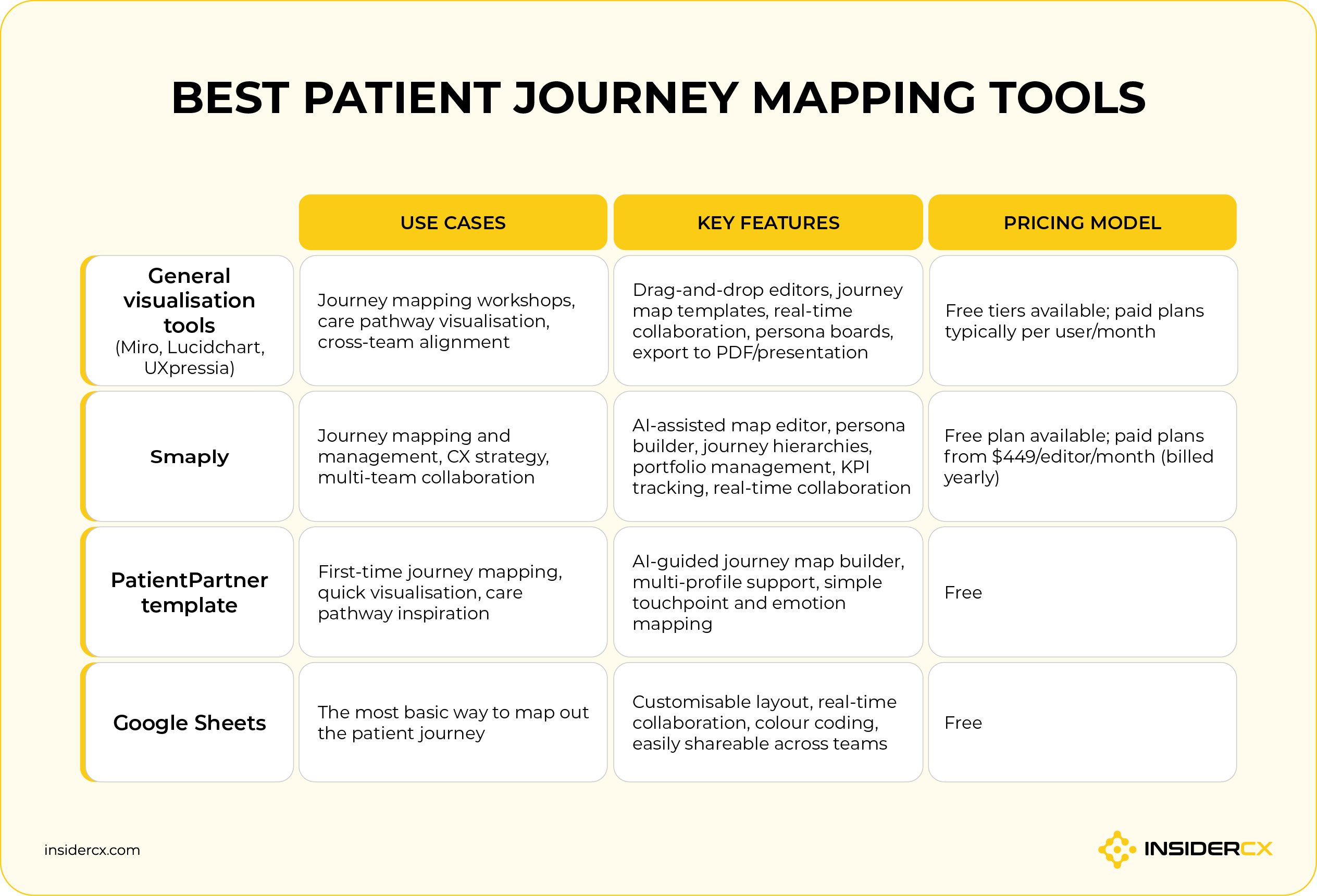
1. General customer journey map visualization tools
You do not need fancy or expensive tools to outline the patient journey. There are plenty of simple tools to get the journey out of people's heads and onto a shared canvas.
General visualisation tools like Miro or UXpressia are a practical starting point for teams mapping patient pathways for the first time or running workshops with clinical staff.
Common features:
- Drag-and-drop journey map and flowchart templates.
- Real-time multi-user collaboration and commenting.
- Pre-built healthcare and CX journey map templates.
- Sticky notes, swimlanes, and persona boards for workshop facilitation.
- Export to PDF, image, or presentation formats.
- Integration with tools like Slack, Jira, and Microsoft Teams.
Tools worth considering:
- Miro: The most widely used collaborative whiteboard, with a large library of journey mapping templates and strong facilitation features for cross-functional workshops.
- Lucidchart: Better suited to structured process and flowchart mapping, useful for visualising clinical workflows and care pathways with precision.
- UXpressia: Purpose-built for journey mapping and persona creation, with healthcare-specific templates and the ability to map multiple personas across the same journey.
- Microsoft Visio: A solid option for organisations already in the Microsoft ecosystem that need structured, shareable process diagrams.
2. Smaply
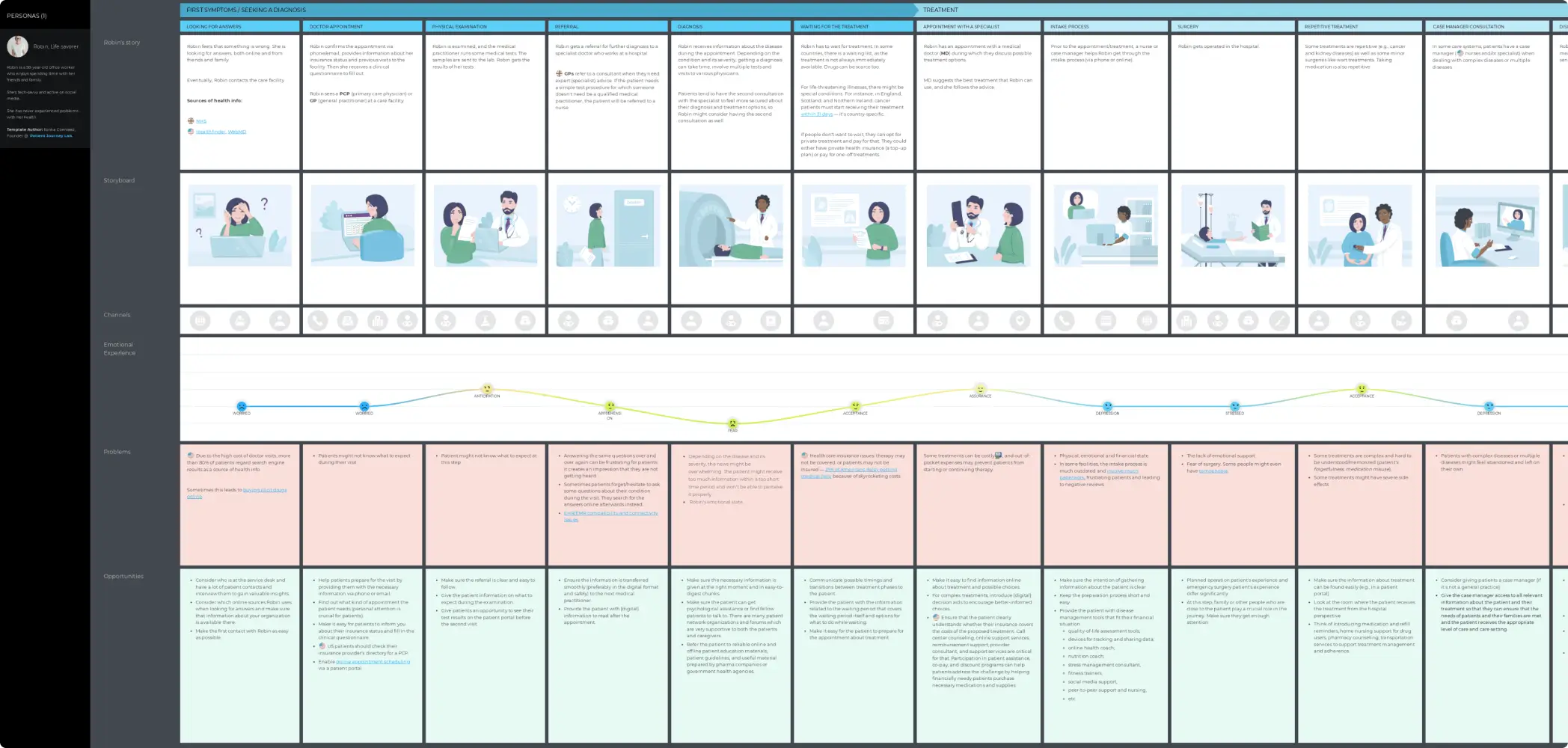
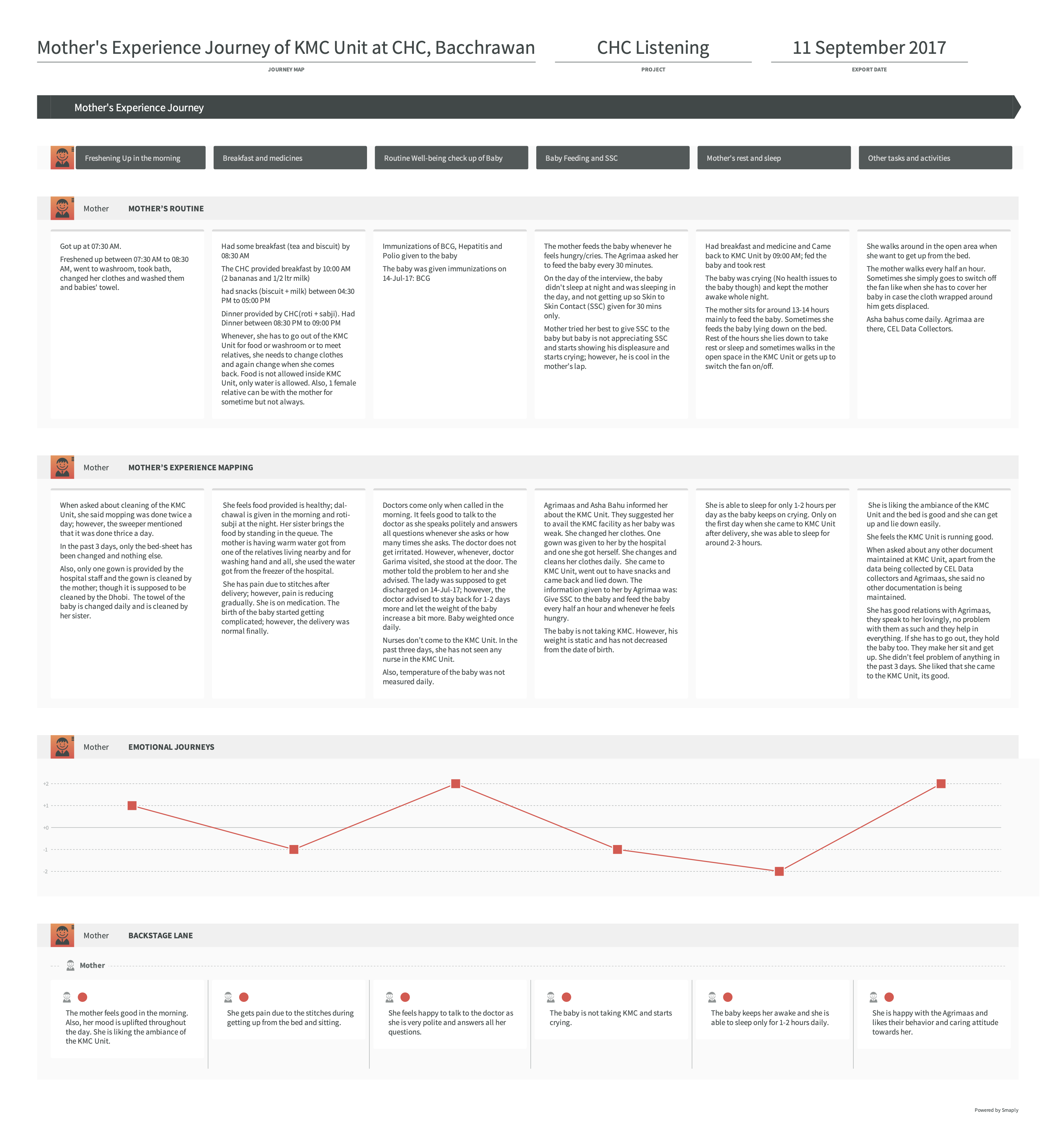
Smaply combines an intuitive drag-and-drop map editor with AI-assisted map generation, persona creation, journey hierarchies, and portfolio management. It gives CX and quality teams a single hub to visualise, prioritise, and act on experience insights across the organisation.
How Smaply supports patient journey mapping:
- Drag-and-drop journey map editor with stages, emotions, channels, pain points, opportunities, and solutions mapped per touchpoint.
- AI-assisted map generation that turns a simple description into a structured journey map, then refines every step.
- Persona builder with emotion visualisation and multi-persona comparison on a single map.
- Journey hierarchies to link related care pathway maps into a connected, searchable repository of CX insights.
- Portfolio management for identifying and prioritising key pain points and opportunities across all maps at a glance.
- Journey Performance Indicator to monitor the health of each map over time.
Smaply offers a free-forever plan plus three paid tiers: Repository (from $38/editor/month), Framework (from $67/editor), and Governance (from $96/editor). All paid plans include unlimited maps and personas.
3. Free patient journey mapping tool from PatientPartner
PatientPartner is primarily a patient engagement and mentorship software for pharma, medical devices, and clinical trials. While patient journey mapping isn't their core offering, they do have a free, interactive AI-powered journey mapping tool on their blog.
The tool walks you through the key stages of the patient journey, prompting you to input touchpoints, patient emotions, and pain points at each step. After you do that, it will generate a visual map based on your inputs.
It supports multiple patient profiles, so you can map different scenarios (such as an acute care visit versus a chronic illness pathway) without starting from scratch.
It's free, requires no sign-up, and is best used as a starting point for teams new to journey mapping or looking for inspiration before investing in a more structured solution.
4. Google Sheets
Sophisticated visualisation tools help, but they're not a prerequisite for meaningful patient journey mapping. The discipline and accuracy of data entered matter more than the medium.
A well-structured spreadsheet can capture every stage of the patient journey, the touchpoints within each stage, patient emotions, pain points, and improvement opportunities, plus it can be shared, updated, and discussed by the whole team without any onboarding or licensing costs.
Google Sheets (or Excel) works surprisingly well for this. Set it up like this:
- Columns: journey stages (e.g., first contact, booking, arrival, consultation, discharge, follow-up).
- Rows: touchpoints, patient actions, emotions, staff involved, pain points, and improvement opportunities.
- Colour coding: use conditional formatting to flag pain points or high-emotion moments at a glance.
- Sharing: invite your clinical and operations team to collaborate and annotate directly in the sheet.
It won't generate a polished visual automatically, but it forces the right conversations and surfaces the right questions.
If you want to go down this route and do it properly, here is recommended reading to learn more about how to do patient journey mapping correctly:
- Patient Journey Mapping: A Complete Guide — a thorough walkthrough of how to approach the process correctly, from defining personas to identifying moments of truth.
- Patient Journey Mapping Infographic — a visual overview of the key stages and what to capture at each one.
How to choose the right healthcare journey management software for your clinic
With tools ranging from collaborative whiteboards to enterprise AI platforms, choosing the right one comes down to understanding what problem you're actually trying to solve. Here's what to consider before committing:
- Your primary goal: Are you looking to visualise the journey, automate scheduling and communication, collect and act on patient feedback, or analyse clinical data at scale?
- Integration requirements: Check whether the tool connects with your existing EHR/EMR, CRM, or scheduling system, and how deeply.
- Ease of use and scalability: A platform that works for a single site may struggle across multiple locations. Consider whether the tool supports role-based access, multi-site dashboards, and reporting at the group level.
- Compliance and security: Ensure the platform meets relevant standards for your region (HIPAA for the US, GDPR for Europe) and offers features like role-based access controls and audit trails.
- Budget fit: Look beyond the licence fee. Factor in implementation costs, required integrations, and ongoing support to understand the true cost of ownership.
Not sure which tool fits your situation? Here are a few common scenarios:
- You're just getting started and need a low-cost way to visualise your patient journey → Any of the visualisation tools we covered will do.
- You're a multi-site private healthcare provider looking to systematically measure and improve patient experience → InsiderCX and Sogolytics are built for exactly this – automated feedback collection across every location, patient experience analytics, and reporting infrastructure to support quality management and accreditation.
- You're a small or mid-sized dental or medical practice looking to automate scheduling, intake, and patient communication → NexHealth or Luma Health are worth evaluating, with NexHealth better suited to smaller practices and Luma scaling better for larger organisations.
- You're an enterprise health system or research organisation needing to structure and analyse clinical data across large patient populations → Agentforce Health or John Snow Labs PJI are the tools to consider, depending on whether your priority is care coordination or longitudinal clinical data analytics.
Optimize patient experience at every stage of the patient journey with InsiderCX
At the heart of every well-run clinic is a simple truth: patients who feel heard, respected, and well cared for come back, and often bring others with them. Patient-centred care is a business imperative, which you can't deliver consistently without understanding what patients actually experience at every stage of their journey.
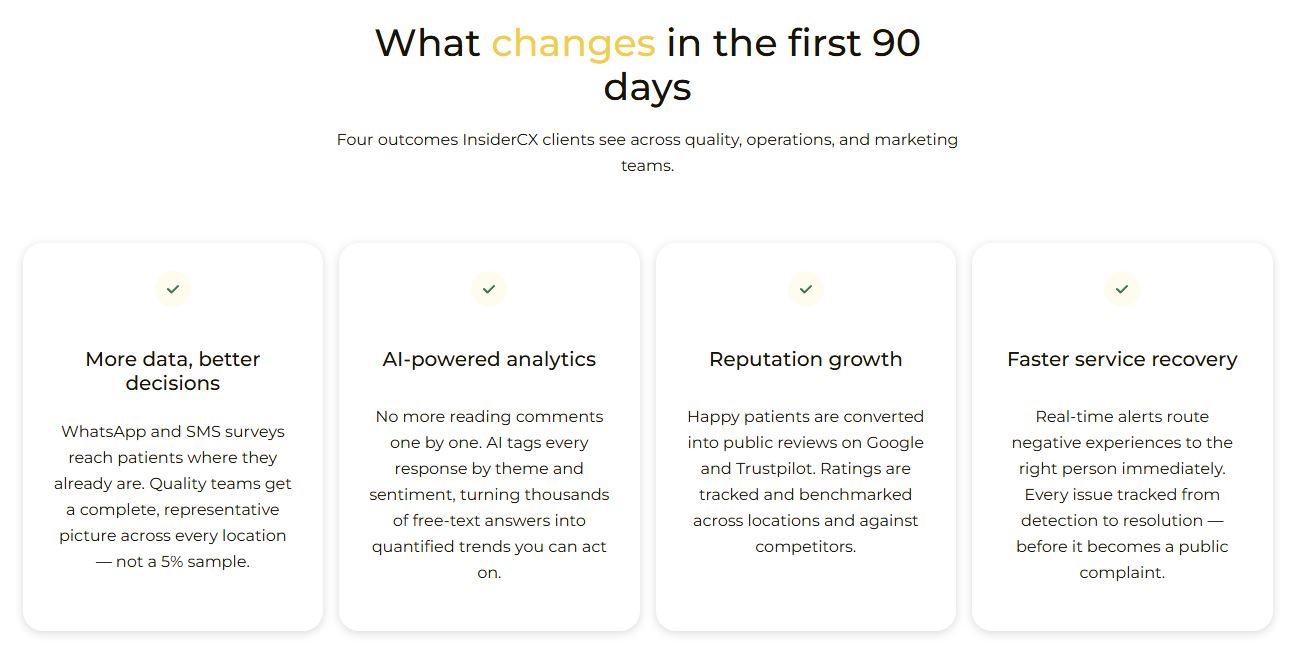
For private clinics serious about growth, InsiderCX covers the entire patient journey: better experiences drive stronger retention, resolved issues stay off public review platforms, and consistent quality builds a reputation that attracts new patients.
InsiderCX is live in under two weeks. It’s a turnkey solution in which implementation, integration, and survey design are handled entirely by our internal experts. The platform is GDPR compliant, with EU data residency and no direct access to patient records. Every client gets a dedicated healthcare account manager, plus automated weekly/monthly progress reports.
Schedule a demo to see how InsiderCX can help you measure and improve the patient experience across every touchpoint


